桌面专注助手 · macOS 14+ Desktop focus helper · macOS 14+

让你喜欢的小可爱
把你拽出来
Let your favorite cutie
pull you out

每隔一段时间,主子从屏幕角落瞬移到中央,让你抬头喘口气;时间到了 ta 就自己回角落继续守着。完全本地、零网络请求。 Every once in a while, your pet teleports from a screen corner to the center to make you look up and breathe. When the break ends, it walks back to the corner. 100% local, zero network calls.

v0.10.0 · 未公证 DMG · 首次打开需一行命令unsigned DMG · one command on first launch
MewMew app icon
01 · 它在干什么What it does

三件事,全在 menu bar 后台Three quiet jobs, all in the menu bar

不占 Dock 位置。没有声音。只靠主子的视觉出场打断你。 No Dock icon. No sound. The only signal is your pet showing up on screen.

专注计时Focus timer

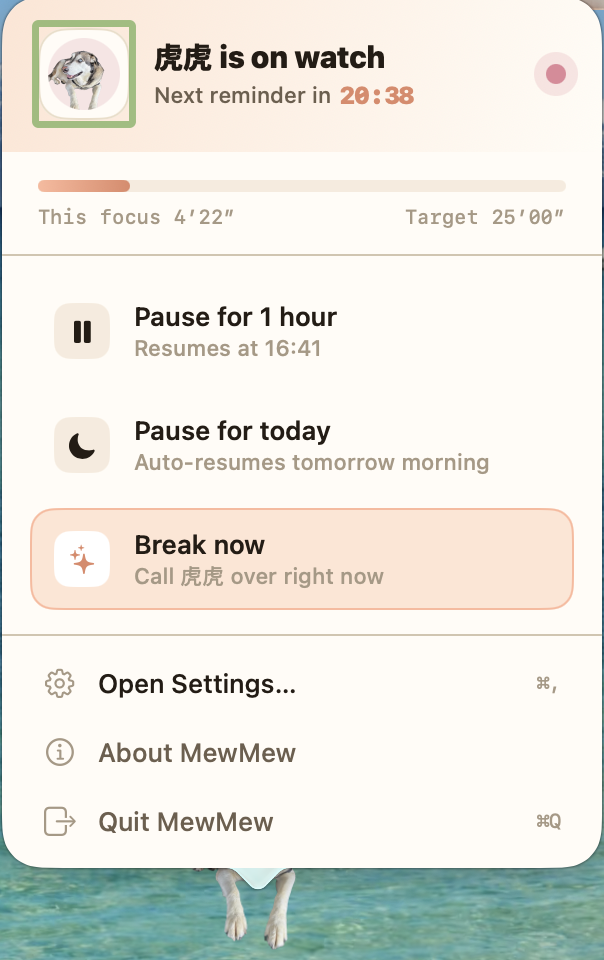
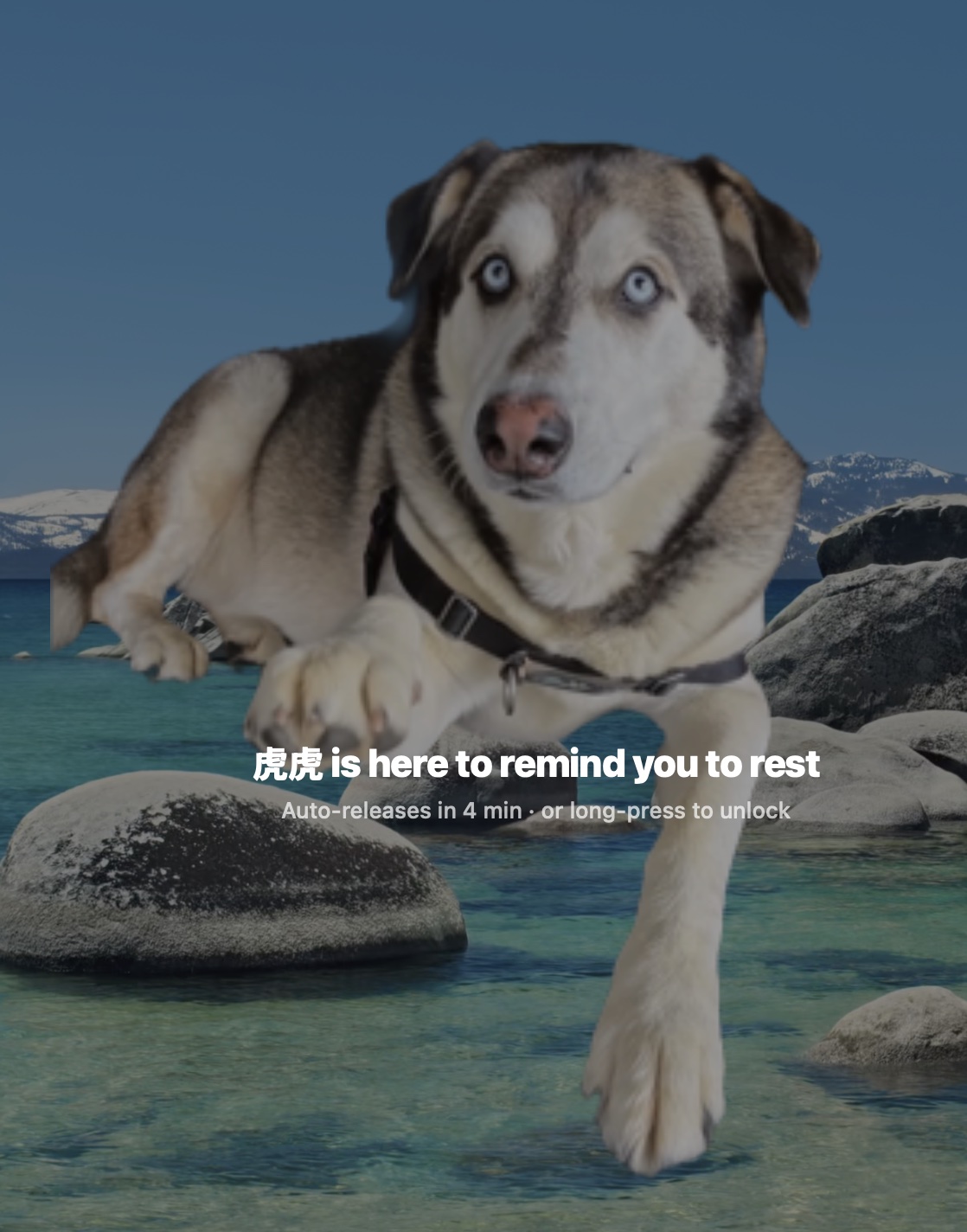
到点叫主子从角落跑到屏幕中央站岗 N 秒,你抬头活动一下。 Every N minutes, the pet runs from the corner to the center and stays for a short break.

分心 App 限制Distraction limit

选几个容易上瘾的 App,在里面待太久也会被主子打断。 Pick the apps that suck you in — spend too long there and your pet pops out too.

用你自己的宠物Bring your own pet

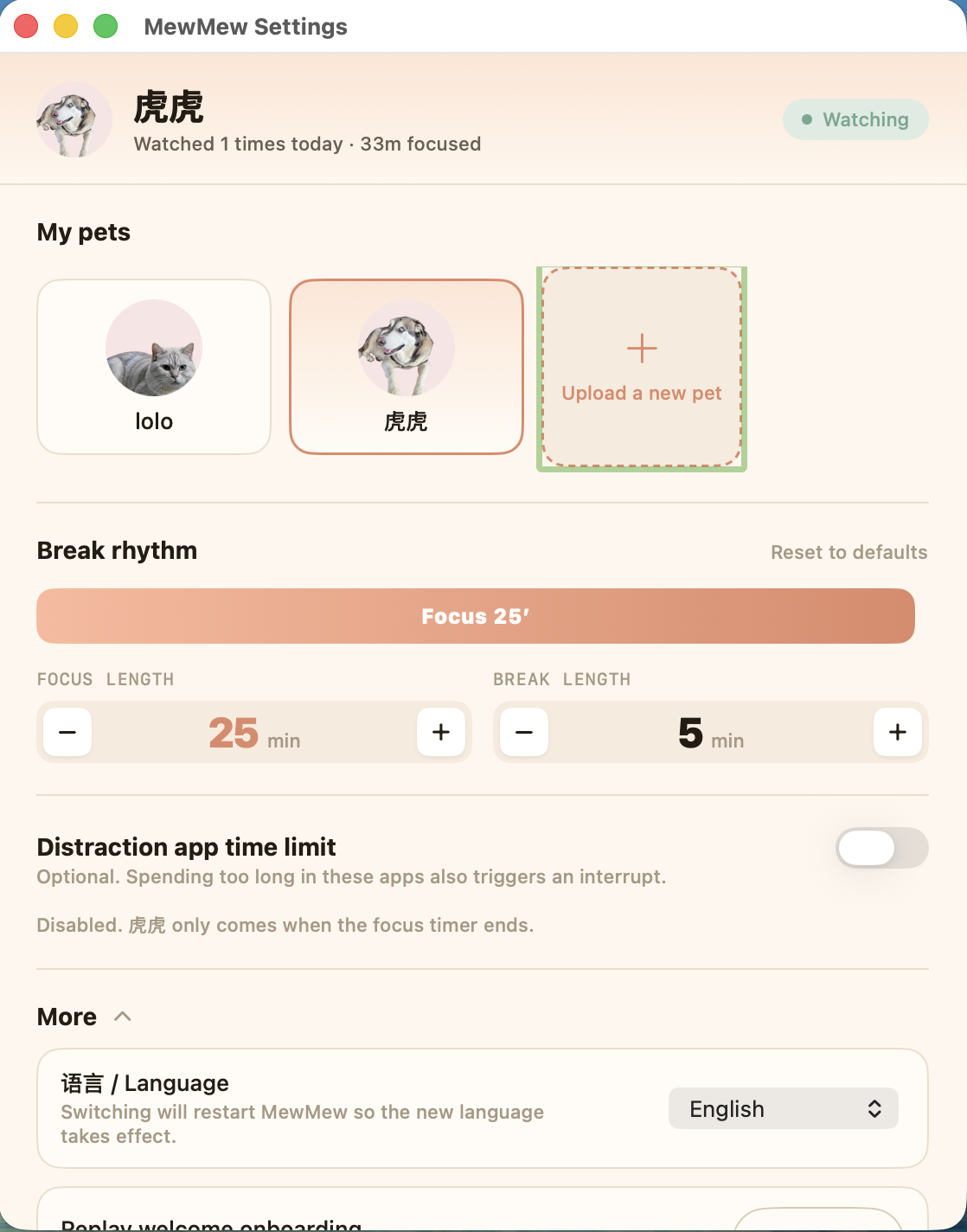
预装虎虎 + lolo 两只。也能上传两段你家宠物的视频做一只新的。 Husky + lolo bundled. Upload two short clips of your own pet to make a new one.

02 · 长什么样Screenshots

菜单栏 → 设置 → 打断你的那一刻Menu bar → Settings → the moment it pulls you out

三张图按顺序看完,整个产品逻辑就一目了然了。 Three frames, in order — the whole product loop in one glance.

MewMew menu-bar popover showing focus countdown and quick actions 01 菜单栏卡片Menu-bar card
MewMew settings window showing pet selection, break rhythm, and language switcher 02 设置 + 中英切换Settings + bilingual
MewMew interrupt overlay — a husky teleports to the screen center to remind you to rest 03 主子来打断你Your pet pulls you out
03 · 怎么装How to install

三步,不到 30 秒Three steps, under 30 seconds

没花 99 刀走 Apple 公证流程,所以 DMG 是未签名的,多了一步解除 macOS 隔离的命令。 The DMG isn't notarized (Apple charges $99/year). One extra command lifts macOS's quarantine flag.

1

下载 DMG 并打开Download and open the DMG

GitHub Releases 抓最新的 MewMew-0.10.0.dmg,双击挂载,把 MewMew.app 拖到 Applications。 Grab the latest MewMew-0.10.0.dmg from GitHub Releases, mount it, drag MewMew.app into Applications.

2

在终端跑一行命令Run one command in Terminal

解除 macOS 给"非 App Store"应用打的隔离标记。 Lifts the macOS quarantine flag that's applied to non-App-Store apps.

xattr -dr com.apple.quarantine /Applications/MewMew.app
3

打开 MewMewLaunch MewMew

菜单栏出现一只爪印——欢迎引导会自动弹出,让你选主子、设节奏。 A paw icon shows up in the menu bar. The welcome flow opens automatically — pick a pet, set your rhythm.

04 · 隐私Privacy

没有什么可承诺的——技术上根本没接外网Nothing to promise — there's no network code

v0.10.0 砍掉了之前可选的 AI 视频生成路径。现在 app 里搜不到一行 URLSession。 v0.10.0 removed the optional AI video-generation path. You won't find a single URLSession call in the codebase.

零网络请求Zero network calls
无 telemetry / 崩溃上报No telemetry or crash reporting
MIT 开源 · 代码可审计MIT-licensed · auditable
05 · FAQ

常见问题Common questions

为什么 macOS 一上来不让我打开?
因为开发者抠门,没掏 Apple 那 99 刀/年的公证费。macOS 看见非 App Store 的 app 就给打个 "quarantine" 小条子,xattr -dr 那行命令把条子撕掉就完事,撕完跟正版没两样。这事只在你第一次下载时折腾你一次。
它会偷偷上传我的数据吗?
想偷也偷不了——整个 app 就没写过一行网络代码。你不信可以去源码里搜 URLSession,一个都搜不到。曾经那点 AI 生成路径,v0.10.0 已经被亲手砍干净了。
支持 Windows / Linux 吗?
现在只有 macOS(14 Sonoma+)。Windows 那套窗口 API 长得跟 macOS 完全是两个物种,UI 层和 overlay 都得从头写——暂时没动力。
怎么卸载?
/Applications/MewMew.app 扔废纸篓就行。想连本地数据一起清干净,顺手删掉 ~/Library/Application Support/MewMew/ 这个目录,主子的痕迹一点不留。
能改源码 / 商用 / 再分发吗?
可以可以可以——MIT 协议你随便玩。fork、魔改、卖钱、做 SaaS 都行,记得在 LICENSE 里留一行原作者版权声明就完事。
Why does macOS refuse to open it the first time?
Because the developer was too cheap to pay Apple's $99/year notarization fee. macOS slaps a "quarantine" sticker on every non-App-Store app, and that xattr -dr command just peels the sticker off. After that MewMew runs like any other app — and you only get bugged about it once.
Does it secretly upload my data?
Couldn't if it wanted to — there's not a single line of networking code in the app. Don't trust me, grep URLSession in the source yourself, you'll get zero hits. The old AI-gen path got personally executed in v0.10.0.
Windows / Linux support?
macOS only (Sonoma 14+). Windows' window-management APIs look like a different species entirely — UI layer and overlay would both need a full rewrite, and motivation is currently nowhere to be found.
How do I uninstall?
Drag /Applications/MewMew.app to the Trash. To also wipe local data, nuke ~/Library/Application Support/MewMew/ and your pet leaves no trace.
Can I modify / sell / redistribute?
Yes, yes, and yes — MIT licensed, do what you want. Fork it, hack it, sell it, build a SaaS on it. Just keep the original copyright line in LICENSE and we're good.